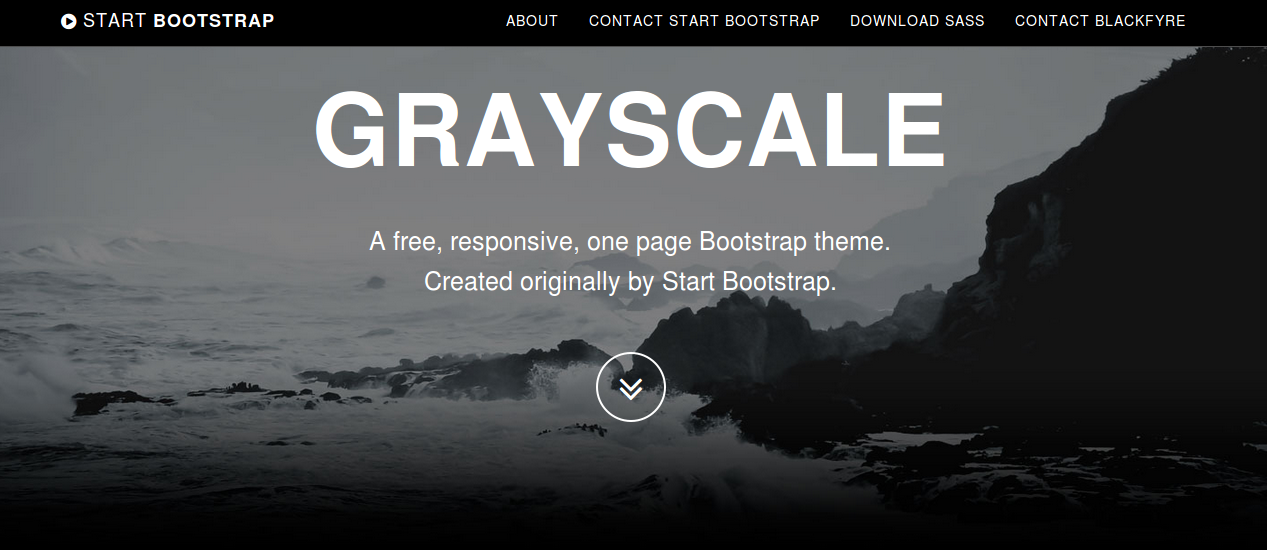
I want to install a theme called Grayscale of Start Bootstrap and I don’t know how to do it.
Install a new Ruby on Rails by running >> rails new grayscale. Navigate to your project folder >> cd grayscale then run the following commands:
Sass / SCSS
>> git clone https://github.com/blackfyre/https://github.com/blackfyre/grayscale-sass.git.git
>> cd grayscale-sass
>> bower install
>> cd ..
>> mv app/assets/stylesheets/application.css app/assets/stylesheets/application.scss
Then edit app/assets/stylesheets/application.scss. This file should contain only the following line of code:
@import '../../../grayscale-sass/assets/sass/main.scss';
Javascipt
Edit app/assets/javascripts/application.js. This file should contain the code like that shown below:
//= require jquery
//= require jquery_ujs
//= require turbolinks
//= require_tree .


//= require grayscale-sass/assets/bower_components/jquery.easing/js/jquery.easing.js
//= require grayscale-sass/assets/bower_components/bootstrap/dist/js/bootstrap.js
//= require grayscale-sass/assets/js/grayscale.js
Views
Create a controller called “welcome” with an action called “index”, by running the following command:
>> bin/rails generate controller welcome index
The app/views/welcome/index.html.erb and app/views/layouts/application.html.erb should be edit according grayscale-sass/index.httml
index.html.erb
<!-- Navigation --> <nav class="navbar navbar-custom navbar-fixed-top" role="navigation"> <div class="container"> <div class="navbar-header"> <button type="button" class="navbar-toggle" data-toggle="collapse" data-target=".navbar-main-collapse"> <i class="fa fa-bars"></i> </button> <a class="navbar-brand page-scroll" href="#page-top"> <i class="fa fa-play-circle"></i> <span class="light">Start</span> Bootstrap </a> </div> <!-- Collect the nav links, forms, and other content for toggling --> <div class="collapse navbar-collapse navbar-right navbar-main-collapse"> <ul class="nav navbar-nav"> <!-- Hidden li included to remove active class from about link when scrolled up past about section --> <li class="hidden"> <a href="#page-top"></a> </li> <li> <a class="page-scroll" href="#about">About</a> </li> <li> <a class="page-scroll" href="#contact">Contact Start Bootstrap</a> </li> <li> <a class="page-scroll" href="#download2">Download SASS</a> </li> <li> <a class="page-scroll" href="#contact2">Contact Blackfyre</a> </li> </ul> </div> <!-- /.navbar-collapse --> </div> <!-- /.container --> </nav> <!-- Intro Header --> <header class="intro"> <div class="intro-body"> <div class="container"> <div class="row"> <div class="col-md-8 col-md-offset-2"> <h1 class="brand-heading">Grayscale</h1> <p class="intro-text">A free, responsive, one page Bootstrap theme.<br>Created originally by Start Bootstrap.</p> <a href="#about" class="btn btn-circle page-scroll pulse"> <i class="fa fa-angle-double-down"></i> </a> </div> </div> </div> </div> </header> <!-- About Section --> <section id="about" class="container content-section text-center"> <div class="row"> <div class="col-lg-8 col-lg-offset-2"> <h2>About Grayscale</h2> <p>Grayscale is a free Bootstrap 3 theme created by Start Bootstrap. It can be yours right now, simply download the template on <a href="http://startbootstrap.com/template-overviews/grayscale/">the preview page</a>. The theme is open source, and you can use it for any purpose, personal or commercial.</p> <p>This theme features stock photos by <a href="http://gratisography.com/">Gratisography</a> along with a custom Google Maps skin courtesy of <a href="http://snazzymaps.com/">Snazzy Maps</a>.</p> <p>This version of Grayscale includes full HTML, CSS, and custom JavaScript files along with SASS files and bower for an even easier customization.</p> </div> </div> </section> <!-- Contact Section --> <section id="contact" class="container content-section text-center"> <div class="row"> <div class="col-lg-8 col-lg-offset-2"> <h2>Contact Start Bootstrap</h2> <p>Feel free to email us to provide some feedback on our templates, give us suggestions for new templates and themes, or to just say hello!</p> <p><a href="mailto:feedback@startbootstrap.com">feedback@startbootstrap.com</a> </p> <ul class="list-inline banner-social-buttons"> <li> <a href="https://twitter.com/SBootstrap" class="btn btn-default btn-lg"><i class="fa fa-twitter fa-fw"></i> <span class="network-name">Twitter</span></a> </li> <li> <a href="https://github.com/IronSummitMedia/startbootstrap" class="btn btn-default btn-lg"><i class="fa fa-github fa-fw"></i> <span class="network-name">Github</span></a> </li> <li> <a href="https://plus.google.com/+Startbootstrap/posts" class="btn btn-default btn-lg"><i class="fa fa-google-plus fa-fw"></i> <span class="network-name">Google+</span></a> </li> </ul> </div> </div> </section> <!-- Download SASS Section --> <section id="download2" class="content-section text-center"> <div class="download-section"> <div class="container"> <div class="col-lg-8 col-lg-offset-2"> <h2>Download Grayscale</h2> <p>You can download the SASS version of Grayscale for free on the GITHUB page.</p> <a href="https://github.com/blackfyre/grayscale-sass/" class="btn btn-default btn-lg">Visit the Download Page</a> </div> </div> </div> </section> <!-- Contact Section --> <section id="contact2" class="container content-section text-center"> <div class="row"> <div class="col-lg-8 col-lg-offset-2"> <h2>Contact Blackfyre</h2> <p>If you have problems with the <b>SASS version</b> of the original template, please report it at the</p> <p><a href="https://github.com/blackfyre/grayscale-sass/issues">GITHUB Issues page</a> </p> <ul class="list-inline banner-social-buttons"> <li> <a href="https://twitter.com/gnick666" class="btn btn-default btn-lg"><i class="fa fa-twitter fa-fw"></i> <span class="network-name">Twitter</span></a> </li> <li> <a href="https://github.com/blackfyre" class="btn btn-default btn-lg"><i class="fa fa-github fa-fw"></i> <span class="network-name">Github</span></a> </li> </ul> </div> </div> </section> <!-- Map Section --> <div id="map"></div> <!-- Footer --> <footer> <div class="container text-center"> <p>Copyright © Your Website 2014</p> </div> </footer> <!-- Google Maps API Key - Use your own API key to enable the map feature. More information on the Google Maps API can be found at https://developers.google.com/maps/ --> <script type="text/javascript" src="https://maps.googleapis.com/maps/api/js?key=AIzaSyCRngKslUGJTlibkQ3FkfTxj3Xss1UlZDA&sensor=false"></script>
application.html.erb
<!DOCTYPE html>
<html>
<head>
 <title>Grayscale</title>
 <%= stylesheet_link_tag 'application', media: 'all', 'data-turbolinks-track' => true %>
 <%= csrf_meta_tags %>
</head>
<body id="page-top" data-spy="scroll" data-target=".navbar-fixed-top">

<%= yield %>
<%= javascript_include_tag 'application' %>
</body>
</html>
Fonts
>> cp -r grayscale-sass/fonts public
Images
>> cp -r grayscale-sass/assets/images public
Test
Now you can run >> bin/rails server and open http://localhost:3000/welcome/index in your browser. The result now should look like that shown in the figure beneath: